

Goosh

Those of you who, like me, were born… less recently than others, might enjoy playing with a new interface to Google developed by Stefan Grothkopp that mimics Unix command line functionality, and which takes me back to MS-DOS, Pine, Basic and beyond.
Goosh (Google shell) starts you out with a simple command line:

Put in your search terms (I used “recission”), and you are given back:
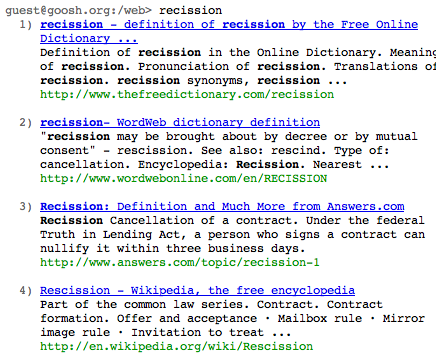
There is a help function (type h and return) that lists the various commands this front end will accept. You can search Google’s videos, images, news, maps etc, type m to get more results, type c to clear the screen, and so forth.
It’s worth noting that the results you’ll get are not exactly the same as the results you get from using the regular Google page: I know because in Google “slaw” brings up our blog first, but in Goosh it doesn’t show up until you’ve brushed a whole lot of shredded cabbage out of the way. Still, it’s fun and fast.

This is a neat interface, even for those of us who were born “more recently” but still enjoy all things technical. I prefer using the keyboard to a mouse in general so I found this site enjoyable, though often it is just easier to use the Unix command line if you have it available.
For those of you that do use Unix (or Linux) you may want to try “w3m” as a good text browser if Lynx is not your thing.
If the thing isn’t a better speller than it seems, it puts the validity of any search results in question.
i’m still using pine !!