

Google Adds New Options to Search

Google today launched a set of new options for filtering and presenting its search results. Now when you do a search, you’ll see a link in the upper left corner of the results page offering to “show options”:

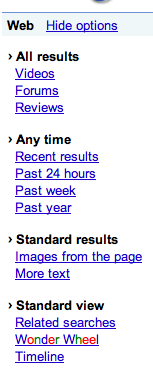 This opens a menu down the right-hand side of the window displaying a dozen filters, as shown in the image to the left. The videos option displays thumbnails of videos, mostly from YouTube, whose titles contain your search terms. The forum option (somehow) manages to find in your results the hits from forums. Reviews seems to select journals and book reviews. The time filters have obvious functions, and have been available in advanced search for some time now. Images from the page picks those results that have images and displays thumbnails of two of the graphics to the right of the usual (con)text excerpt. More text doubles or triples the (con)text excerpt, where that’s possible. Related searches creates a menu at the top of suggested refinements of you search. Timeline, which we’ve mentioned before on Slaw, orders your results into a dated timeline where they lend themselves to that.
But the real novelty, though how useful it will be remains to be seen, is Wonder Wheel. This is Google’s version of software that has been around for many years and that displays results as dynamic clusters of links to other dynamic clusters. Clicking on one link establishes it as the new center of the system, etc.
This is a big change for Google and I can only wonder whether they feel some warm (I won’t say ‘hot’) breath on their neck from Wolfram/Alpha, set to launch some time this month.

Comments are closed.